🚀 Introduction
If you’ve ever wondered how websites survive sudden popularity without crashing, this guide is for you.
This article explains:
- What scaling means in modern cloud environments
- How websites stay online during sudden traffic spikes
- Why autoscaling is one of the most essential concepts in infrastructure design
✅ What Is Scaling?
Scaling is the mechanism that adjusts your server capacity—either making servers stronger or increasing the number of them—based on incoming traffic.
Think of it like a convenience store:
- Usually one cashier is enough
- During lunchtime, three registers open
- Late at night, it goes back to one
Cloud platforms perform this adjustment automatically.
✅ Why Do We Need Scaling?
Scaling exists for two key reasons:
- To prevent downtime when traffic suddenly increases
- To avoid wasting unnecessary resources during low-traffic periods
In short:
- More power when needed
- Lower cost when not
✅ What Happens Without Scaling?
If a site gets unexpectedly popular—viral SNS posts, news mentions, campaigns—traffic can overwhelm the server:
- Pages load slowly
- Users receive 503 errors
- The service becomes unavailable
It’s like 100 customers suddenly rushing into a small store with a single cashier—everything collapses.
✅ Where Does Scaling Help?
Scaling is useful across virtually all online services:
- Blogs & personal sites – stable even when traffic surges
- Online stores – handles sale-day rush
- Mobile games – supports event-driven user spikes
- Educational sites – can survive exam-day traffic floods
- Enterprise systems – ideal for month-end peaks
Cloud platforms refer to this as Auto Scaling (AWS), Autoscaler (GCP), or Virtual Machine Scale Sets (Azure).
💡 Good to Know
1) “Viral traffic crashes the site” used to be common
In the past, servers had fixed capacity. A link from a celebrity could bring a site down in seconds.
This phenomenon was often called a traffic death.
Autoscaling largely solved this problem.
2) Scale-Up vs. Scale-Out
A common beginner confusion:
Scale-Up (Vertical Scaling):
Make one server stronger (more CPU/RAM)Scale-Out (Horizontal Scaling):
Increase the number of servers (add more instances)
Most cloud autoscaling systems rely heavily on scale-out.
3) Autoscaling Looks Like Magic, but Isn’t
Cloud systems constantly monitor metrics like:
- CPU usage
- Concurrent connections
- Response times
When a threshold is crossed, new servers are added proactively.
4) Downsizing Saves the Most Money
Autoscaling isn’t just about adding servers.
If traffic at night is one-tenth of daytime traffic, capacity can shrink to one-tenth as well—cutting costs dramatically.
5) Why Some Services Handle 100× Traffic Spikes
Large-scale services stay stable through a combination of:
- Horizontal scaling
- CDN distribution
- Load balancing
Scaling is the foundation supporting these strategies.
📚 Useful References
Cloud Documentation
- AWS Auto Scaling
https://aws.amazon.com/autoscaling/ - Google Cloud Autoscaler
https://cloud.google.com/compute/docs/autoscaler - Azure Virtual Machine Scale Sets
https://learn.microsoft.com/azure/virtual-machine-scale-sets/
Wikipedia
- Scalability
https://en.wikipedia.org/wiki/Scalability - Cloud Computing
https://en.wikipedia.org/wiki/Cloud_computing
🛠️ Related Topics to Learn Next
- Load Balancer – distributes traffic across servers

Coming Soon
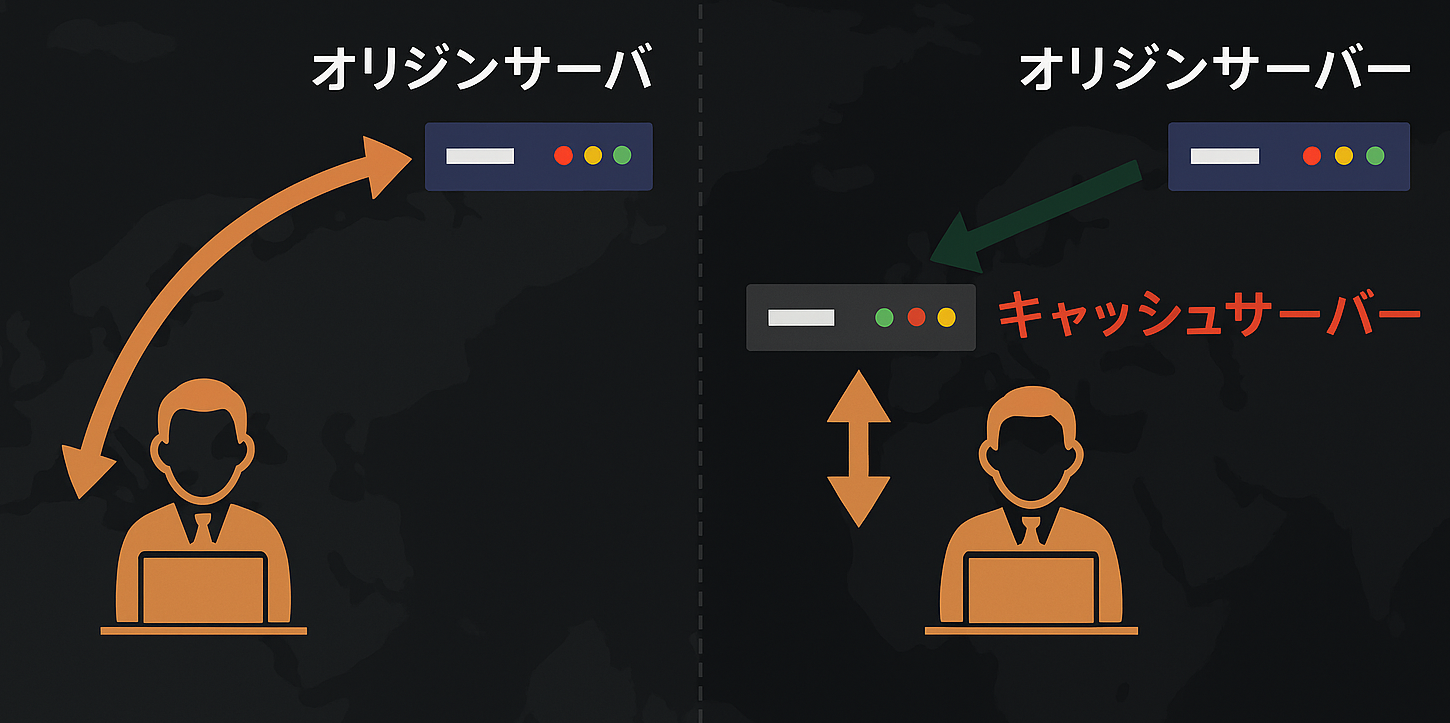
- CDN (Content Delivery Network) – delivers content from nearby locations
Coming Soon
- Cloud Basics (AWS / GCP / Azure)
Coming Soon
- Serverless – scaling without managing servers

Coming Soon
🎯 Summary
- Scaling adjusts server capacity based on traffic
- Autoscaling prevents downtime during spikes
- Scale-up strengthens servers; scale-out increases server count
- Cloud platforms automate the entire process
- It’s essential for reliable, cost-efficient web services